To maximize your visibility and engagement on Facebook, leveraging a dedicated social media scheduler like MadHub is essential. This tool not only streamlines your posting process but also enhances your overall strategy for audience interaction.
Choosing the Right Social Media Scheduling Tool
Understanding Core Functions of Scheduling Tools
An effective social media scheduler should include features such as:
- Automatic Posting: Schedulers allow you to pre-plan your posts at optimal times.
- Analytics Reports: They provide insights into post-performance, helping refine future content strategies.
- Audience Engagement Tools: These tools facilitate interaction with followers based on their responses.
MadHub excels in these areas with its user-friendly interface and robust features tailored specifically for Facebook's unique environment.
Setting Up Your Facebook Page to Support Effective Scheduling
Steps to Optimize Your Facebook Page
Creating a professional-looking page is crucial for successful scheduling. Here’s how you can set it up effectively:
- Page Information: Fill out all necessary details including business name and contact information.
- Cover Photo: Use high-quality images that reflect your brand identity.
- Description: Clearly articulate what your page offers; this boosts searchability.
An optimized page lays a solid foundation for using scheduling tools effectively, ensuring that posted content resonates well with visitors.
Developing a Content Calendar to Enhance Consistency
Methods for Creating an Efficient Content Calendar
Building a content calendar helps maintain consistency across postings:
- Consider using MadHub’s monthly or quarterly planning features.
- Aim for a varied mix of post types—suggested ratios could be 40% images, 40% videos, and 20% links.
A structured approach ensures diverse content that keeps audiences engaged while optimizing scheduling efficiency through tools like MadHub.
Using MadHub for Automated Posting Setup
Practical Steps and Configuration Parameters
Setting up automated posts using MadHub involves several straightforward steps:
- Linking Your Facebook Account to MadHub
- Follow prompts in the application to authorize access securely.
- Configuring Post Timing and Frequency
- Define specific time slots when your target audience is most active (e.g., evenings or weekends).
- Uploading Various Content Formats
- Ensure that you upload each type of content (images/videos) per scheduled plan, allowing automatic rotation between formats accordingly.
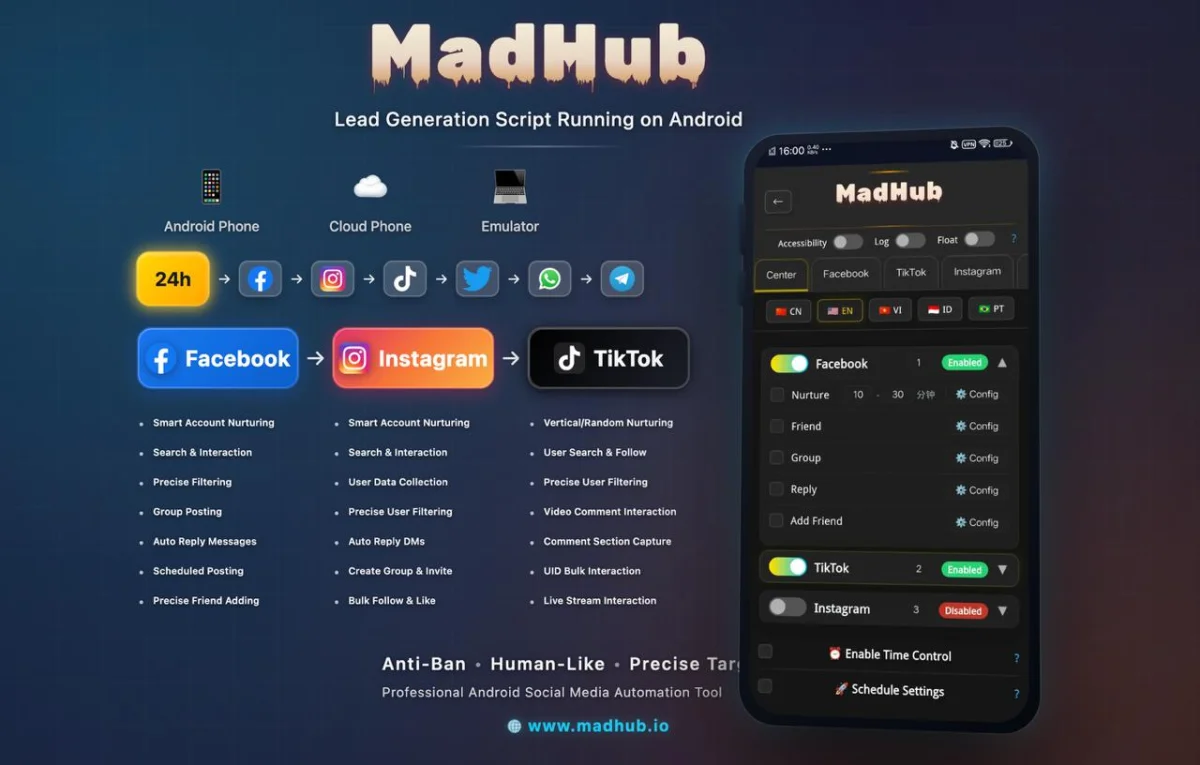
These settings help keep your audience engaged without requiring constant manual updates.
Analyzing Audience Interaction to Adjust Publishing Strategy
Utilizing Data Analysis to Improve Content Strategy
Monitoring engagement metrics from MadHub’s analytics section reveals which types of posts perform best:
- Regularly check reports detailing likes, shares, comments etc., identifying patterns over weeks or months.
- Use this feedback loop strategically; adjust future content timing and themes based on performance data insights gathered via MadHub analytics.
This iterative improvement fosters better alignment with audience preferences enhancing overall effectiveness in outreach efforts.
Increasing Exposure within Facebook Groups
Strategies for Joining Relevant Groups Automatically
Using features within MadHub allows users to identify suitable groups by searching through demographics or interests:
- Search groups aligned with your niche using keywords pertinent to your brand.
- Join groups where potential customers are likely present; engage organically rather than overt promotional activities initially.
- Schedule thoughtful contributions rather than spamming—utilize automated posting capabilities judiciously here too while being mindful of group rules against excessive self-promotion.
This approach increases exposure significantly over time when managed properly through automation!
Optimizing Customer Interaction & Service Experience
Employing Automatic Replies for Swift Response Times
MadHub includes options enabling automatic replies which ensure customer inquiries receive immediate attention:
- Set predefined responses covering frequently asked questions about services/products—this saves time immensely!
- Analyze customer sentiment through feedback collected after auto-replies; refining response templates as needed improves satisfaction rates greatly shown by case studies conducted by many brands employing similar tactics successfully via automation tools like this one!
Such responsive measures cultivate positive relationships leading towards heightened loyalty from clientele thus benefiting long-term growth perspectives monetarily too!
Enhancing Brand Influence & Community Building
Sharing User Generated Content Regularly
Encouraging fans/customers alike sharing their experiences can enhance relatability! Utilize MadHub effectively incorporating UGC into scheduled posts regularly showcasing real-life successes enjoyed due product/services offered builds community visibly around brand ethos thereby fostering trustworthiness whilst generating organic interest levels appreciably upwards gradually over time promoting enhanced visibility altogether!
By utilizing these methods comprehensively alongside advanced functionalities presented through platforms such as MADHUB positioned strategically catering specifically toward FACEBOOK optimization further establishes effective schedules ultimately achieving desired outcomes sought after maximally facilitating results driven campaigns reaching wider audiences efficiently!